
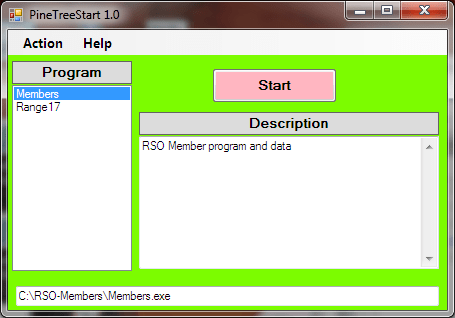
PineTreeStart is a startup program for starting portable programs. A portable program is a program that can run without being installed on a computer. After PineTreeStart starts a program, the program will operate the same as if it were started by a double click on the application exe file. The difference is that only one location needs to be remembered. It is hard to remember where the executable is. File extensions are now often turned off for known programs and that makes things harder.
A program like PineTreeStart can be used to solve these problems. A a program shortcut in windows has the drive letter as part of it’s name. This means you can’t use shortcuts with portable media like a removable disk or USB memory. For use with USB memory the PineTreeStart program, the config.txt file, and the TreeDoc help file should all be in the root directory of the USB device. All of the programs on the USB memory can be accessed thru the PineTreeStart program.
A portable program is one that doesn’t need to be installed. A portable program does not modify the computer’s registry or any associations. The only folders and files used or modified are the folder where the executable was located or a folder within that folder. The SnipAssist program is a portable program. This means you can have the program and a library of snippets on a USB device that can be used on any computer. There are many portable programs.
There are three files that need to be in the same folder on the disk or USB memory device to use PineTreeStart. There is the “PineTreeStart.exe” file that is the program. There is a “config.txt” file that has the information about programs on the disk or USB device. There is also the help file “PineTreeStart-Help.tdf”. These can be in the root directory of the USB device.
The config.txt file has a description of each program and where the program is located. The config.txt file is edited by the user. Any plain text editor can be used or the PineTreeStart edit dialog can be used. Each program is identified by a few features. First is the name of the program that will appear in the menu selection box. Next there is description that tells the user what to expect from the program. Then there is the loaction of the exe file for the selected program.
A line in the config file can be a comment which is ignored. It is important in any file that will be edited that it can have comments such as who edited it or when it was edited. It is also important to be able to comment out sections of the file.
Each portable program is stored in its own folder. The folder has the exe file of course. Any file used by the program should be in that folder like a config file or a help file. This usually means a config.txt file and a help file. A database of work files is often stored in a data folder to make it easier to back up, however, It is a good idea to backup the program along with the data.
Many parts of the C# code in PineTreeStart have been used in other programs. An effort was made to clean things up but there still may be some bits that have been missed. The “program.cs, TreeHelpDlg.cs, AboutDel.cs, Logger.cs, FormCommon.cs, ContxtMenuMgr.cs” files are all reused from other projects. Much of the “Globals.cs” file is also reused. The help file “PineTreeStart-Help.tdf” can be edited with the TreeDoc editor that is available at “PineTreeJoe.com”.
There are two ways the program PineTreeStart can be compiled. There is a constant “Gbls.DebugVersion”. If this is set to false, the normal user version will be compiled and the Logger will be disabled. If this constant is set to true the logger is enabled. If any changes are made to the program it is useful to set the constant = true to be able to see debug information in the generated log. The debug can then be turned off which will hide the logger for normal use.

 PineTreeJoe